Tuesday, December 21, 2021

Monitoring H2 Supply in the Bay Area

 I had a WRX STI for a few years. Super fun car. Then the pandemic hit, cars were difficult to find. I wasn't using a car and my family really only had use for one car. So I sold the Subaru. Then a few months later we needed two cars again, and quickly. I knew I wanted an electric car. So I looked at Teslas, and Leafs, and whatnot, and finally at the Toyota Mirai, remembering earlier in the year hearing about some absolutely amazing deal. The deal was still happening, you could get the car out the door for $15k, and then they'd give you $15k in free fuel for it.

The Toyota Mirai, our fuel cell vehicle

Obviously there was some kind of catch, and it is the fueling situation. Doing a bit of research I learned all about the locations of the fuel stations around the bay area, and a little bit about their reliability. I learned about a recent H2 shortage as a result of a major plant accident. Still, even after all that I decided to jump in. The truth is I have been giddy about this car for as long as I have known about it. I used to try to spot them driving around the bay area, and when I found one, I might follow it until it dispensed water. They are really cool cars. Electricity from hydrogen, totally wild!

Now, a few months in and it is going about as well as I expected. I have had some close calls with fueling, letting the tank run low, really risking having to be towed. The thing I failed to completely anticipate was how reliable the station status reporting system actually is. I have learned a station's status is not a fully automated measurement. And why would it be? There are only so many ways to detect automatically that a station is down, and many more modes of failure. This means there is a bit of room for predicting when a station will be marked as inoperable. At the very least seeing longer term statistics helps me to decide if I should head to a station, wait another day, or go to a different station, perhaps less convenient.

There are two sites for monitoring California's hydrogen station status, https://m.cafcp.org, and https://h2-ca.com/ . The former is provided by the California Fuel Cell Partnership, and is the canonical source for live station status data. The latter is a website created by an avid H2 driver, Doug Dumitru. It provides a limited-term (90 day statistics) view of regional data and seven days of history for each individual station. Some station statistics are also provided, including historical %-uptime. Doug's site has proven to be extremely helpful, and has certainly played a role in helping me make good choices when picking stations.

However, I want longer term trends and statistics. I also wanted to develop my own predictive algorithms to give an estimated probability for the station still being online when I get there. 

My approach began with what I knew. Scrapy was how I started. After inspecting the CAFCP website and spending some time attempting to parse the page I learned there was a background XHR object being digested by the page and used to dynamically update the page. It was breaking my casual attempt at scraping, so instead of scraping the page, I tried using Python to simply get the json being sent in the XHR. It worked!

Data in hand, it was time to select a database. MySQL seemed like an obvious choice, but consulting with a coworker I started looking into schema-less options. InfluxDB was something I had heard of, so I checked it out. After a few circles I had my NAS running an InfluxDB container. In skimming the documentation I realized the Influx Data platform had a lot to offer, including a system for ingesting json data. Tinkering and futzing with the json data pipeline, I eventually came to the conclusion the json from the CAFCP source was all kinds of weird, and the poor json plugin for Influx is not powerful enough to parse it. Defeated I started to resign myself to writing Python for a parser after all.

Once again in the docs, I came across something called Starlark. Like IEC-61131-3 ST is to C, Starlark is to Python. Specifically made to parse weird stuff, or so it seems, Starlark was the answer. An hour or so to learn the basics and I had data flowing into my InfluxDB container, from a Telegraf container running Starlark. This was some kind of magic.

At this point I had been exposed to Docker, Grafana, InfluxDB, Telegraf, Starlark... so many tools, and much credit to the software design choices. They all worked together and quite nicely. It really was a testament to software engineering philosophies and principles of our day. The problems we used to have in doing stuff with computers have certainly changed, with the old problems being dare I say, solved...

Anyways, now with InfluxDB filled with data, I was on to Grafana to build some dashboards. Here is the main one I made after becoming extra familiar with Grafana variables, Flux query language and all the overrides I ever hoped for.


With my basic single station view more or less sketched out I can now prepare to develop my prediction algorithms. If I was really smart, I might try to throw some machine learning at it. I had a lot of fun with this endeavor into metrics and data platforms and as usual learned a bunch.

Tuesday, April 6, 2021

Planeview


Great character, it's been almost long enough to watch TWBB again...

This project is called Planeview and was inspired by the nice view that I have out of my dining room window. I can see planes approaching and departing SFO through the opening of the canyon I live in. It's fun to watch and wonder where they're coming from or heading to, but it would be even more fun to know ;).

I also had some Sparkfun LCD displays that I bought years ago, and collected dust with. Now I had a rad project to use them with! Funny story there though.

So here's where I got to.


Very simple, a screen wired up to an Arduino with a serial interface to display text on the screen. This plugs into a Raspi running a python script. The python script sends a list of plane data to display. The plane data comes from the OpenSky API, which kindly provides plane data within a rectangle. From there I filter the planes not inside the view triangle/ polygon that I mapped out using Google Earth.


One of the trickiest bits was translating between the different GPS coordinate systems. After some trial and error I had the coordinates that worked. When there are no planes the display runs Conway's Game of Life.
Here's some more build photos:


I decided to go with wire wrapping for this project. Of course I had to solder all the header pins on. The wire wrapping was definitely the right choice here. The rest of the construction turned out nice as well. I used some plexi from a Raspi enclosure kit that I had lying around. I also used this project as an excuse to buy some standoff kits that are very handy. But after finishing all the wiring, and deploying the display, I found the backpack board that I had also bought with the displays >_< lol. Basically 80% of the wire wrapping wiring that I had worked on was taken care of by the backpack board. It had been so long since I ordered these parts I had forgotten about it.
Oh well! I enjoyed it.
For my next trick, I will be replacing the display+Arduino with the backpack and an ESP8266 and querying OpenSky directly. I plan on reclaiming the Raspi for other things...


Monday, February 18, 2019

CAP Water Fountain Measuring Ultra Low Current

Almost missed this

I was idly staring at the board and noticed this LED lit up very faintly. It probably affected my last battery test which demonstrated the setup could stay alive in standby for a month. This may mean the setup could have lasted longer. Either way the ultimate test is to measure, somehow, the actual current the whole thing actually consumes.
Faint LED, means my controller code needs a bit of tweaking.

Multimeter

I realized after going through all the gymnastics below, my multimeter was equipped to measure uA. 

Counting Coulombs

Looking around for a u-Ammeter, or some way to make an ultra-low current measurement, I was ultimately directed towards a Coulomb counter. Amplifiers for measuring ultra-low current were somewhat unavailable, and while there are schematics freely available to build these circuits, I didn't want to. I needed something a bit more off-the-shelf. Coulomb counters have become prevalent with IoT, as devices need a way to measure how much charge is actually left in their batteries. Basically the coulomb counter is an integrating current measurement device. As current flows across a shunt resistor, it creates a very small voltage which is amplified, and integrated. As the integrated current adds up, the coulomb counter outputs a pulse for each unit of charge it detects. The average current the counter is measuring is directly related to the time between these pulses. 

LTC 4150

Sparkfun makes an LTC 4150 breakout board, and they have a really nice hookup guide for it. So I got one of those and wired it up. I should see a pulse every 10-30 minutes if the circuit isn't hiding any other leaks. The hookup guide gives two ways to use this board, polling or interrupt. If you poll, they recommend you wire it up so you clear the "INT" pin, with the "CLR" pin. Otherwise you have to catch a very narrow pulse, polling, and that's tough. Also, polling isn't hardcore enough, so I left the solder blob. I could have set up another uC to do this, but I have a perfectly functional scope and logic analyzer, so I opted to use it to bag the pulse.


O-Scope API

When I went shopping for a new o-scope I knew I wanted a USB device. The Analog Discovery 2 had good specifications, a solid GUI, and promised a functional API. The idea of being able to use python to run my scope and acquisitions sounded awesome! Plus it had a built in logic analyzer. Sold.


A bit of hunting and I found the scope API in python. Works great! After some tweaking with the scope GUI I opened my python toolkit, conda, pip, ipython and finally jupyter notebook. Using jupyter notebook was really convenient. I separated the code so cells for opening, closing and configuring the input could be run separately from the code for actually measuring the current. Also I can make a few notes to myself for how to actually operate the thing. I might never go back to using the scope GUI!

Conclusions

I can clearly see an average consumption of up to 78mA while the controller is awake. In standby the consumption drops to 2.3mA average. Wow! Not bad, but not as great as I expected. Something somewhere is leaking... Next I'll start isolating the leak by removing elements of the controller.

Sunday, February 10, 2019

CAP Water Fountain Power Consumption Limbo

Update

Since the last post I have been working a lot to continue to bring my current consumption below 1mA. My last post set the target to 5mA in standby, but first, that technically falls short of my original goal and second it's optimistic. I am not sure the battery actually has that capacity. Getting below 1mA is really tricky and it took a fair amount of scouring the internet for a solution. I actually managed to find a couple of solutions, and I've been running tests on one of them while I finish the design of the second.

Upfront disclosure: I am not going to reveal what I found just yet, as I want to be able to sell the solution first when I eventually give away all the details.


Leaks

As I ran lifetime tests, monitoring the battery voltage, I realized I had a leaky ship. Just looking at the above image you can see some of the issues, hint, they are bright.

The battery

First thing was the battery itself. There were two power consumers in the battery which meant the battery alone wouldn't even stay on without a load for more than a week or so. There are LEDs to indicate the level, and circuitry to measure the voltage and light the LEDs, and an inefficient (by this project's needs) linear regulator supplying the USB 5V (the battery is 12V). Instead of buying a new battery pack, I ripped this one open, disabled the LED status circuits (ripped up traces), and the regulator circuits. I left the battery management board in-place as it seemed to have a large diode in the way of it affecting standby draw.

I replaced the battery built-in regulator with a low quiescent current regulator on my board to convert the 12V to 5 for the thing-dev. (MCP1702)

With all of the extra junk from the battery gone, I ran another test with just the battery and it looks like there's still something eating the juice, but it's negligible for now.

Thing Dev

I ripped up the LED traces from the board, as they consume a nice ~5mA.

Conclusions and next steps

I made some progress reducing current consumption in the design, and this has extended the standby to 20+ days. But this can be improved further. I also realized some time ago I need to directly measure the current consumption, so I've been looking into the best way to do that.

Also, my venture has highlighted a bit of a hole in the realm of wake-up-receivers for ESPs and other IoT things. I think I can put together a board that will plug into the Thing Dev and enable wireless wakeup from a Pi for a close and medium range application. I figure I can't be the first person to wish for such a board. So I've been working on a design and I plan to order the PCB and make a first-article in the next month or so. Hopefully the short and medium range approach both pan out...

Thursday, July 5, 2018

CAP - Water Fountain Power Consumption Issues

I got the thing working but...

I actually got this thing working months ago, but didn't find the time to write the followup. Pics!
Testing the raspi camera and Movidius stick. I deleted lines of code from an example to get this to work. So easy!

Not my finest work, but I was jamming at this point.

A very capable board, for a very simple task. Overkill also brings expediency, I barely had to lift a finger to get the wireless connection going (after I settled on Modbus).

The arrangement looking pretty good.

Yah came together nicely.

I bought this drill bit sometime ago. One of my favorite tools because it does the job so well. Figuring out where to land this hole was a delicate and careful process. I didn't want to ruin the sink.

Faucet nicely installed. Very happy with how it turned out.


I used a spare monitor to work on the pi locally, to get the camera right and set thresholds. I augmented the example I used to detect the cat with an on/off filter for the solenoid and a modbus library for connected to the ESP.


Here's the full test


... the battery runs out in a couple of days!!?

This thing was supposed to last for a month! What happened?

Turns out I didn't really understand the ESP specifications. The low current mode I was basing my design around disables the wifi transceiver which makes this somewhat useless for the cat. Really the ESP gives me an easy wireless interface to the solenoid control, and that's it.

Using Deep Sleep with an Interrupt

I need to get the standby current consumption of the solenoid controller down to miliamps. 5mA would be great, and get me nearly all the way to the goal of a month between charges.
My solution is to use a simple transmitter/receiver pair from the Sparkfun catalog to toggle a ultra-low-current watchdog chip typically used to reset microcontrollers, to reset the microcontroller (ie. wake it up) when the Pi sees a cat. From there we keep the controller alive by toggling the modbus coil. When the cat is finished and the Pi no longer sees a cat, the toggling stops and the controller goes back to sleep.


Of course there are some complications.

The radio works, pretty well...

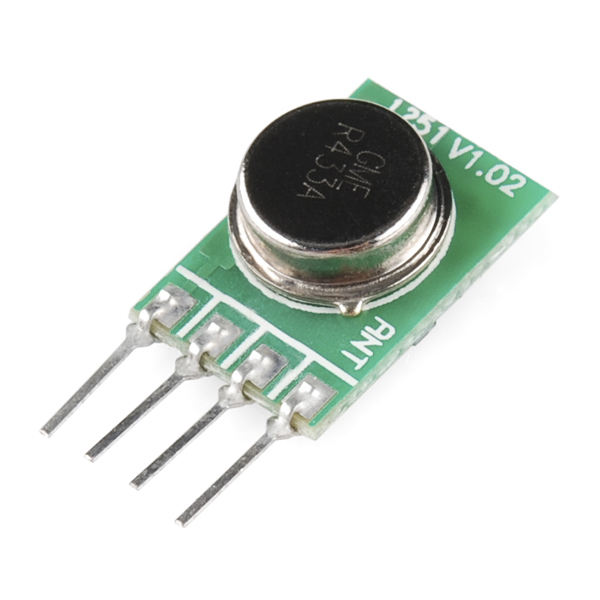
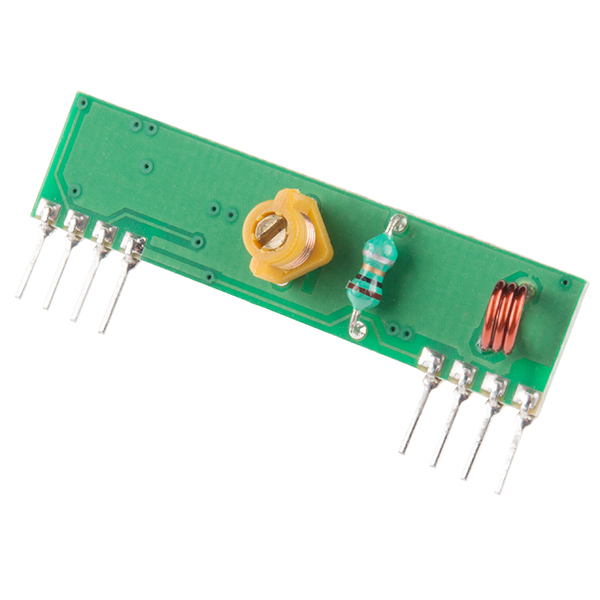
This is the radio:
Transmitter
https://www.sparkfun.com/products/10535


Receiver
https://www.sparkfun.com/products/10533


These little radios are handy. Very low current consumption, around 4.5mA (if I am reading the spec-sheet correctly). They provide a single channel, on-off, so essentially a serial interface. They have a drawback though... When the channel is quiescent, they are very noisy. The trick to using these things is to either discard the first few pulses as a kind of preamble, or to always be transmitting a pulse. 10Hz was the lowest frequency I tried that seemed to keep the noise away.

Watchdog circuit

555 chips can be used to create a watchdog circuit, but they actually consume a fair amount of current, 10mA typically. Nowadays you can find a very very low current watchdog chip typically used for microcontroller applications. I selected the UCC3946. It consumes up to 18uA. Nothing to blush at. I selected a timing capacitor to set the WD period to 10ms.

Proper toggling

To wake the chip up I just need to slow my GPIO toggle period to 10Hz. To keep the controller in whatever state it's currently in, asleep or awake, I just toggle it at 100Hz or faster.

More efficient solenoid driver

During the time when this was working...somewhat I started on a sprinkler controller and started learning more about solenoid driver circuits. Obviously with a sprinkler controller, especially one running on a battery, you want power efficiency wherever you can manage it.

Spike and hold

Spike and hold uses a voltage spike to open the solenoid and a lower voltage to keep the solenoid open. So I can lower the power consumption of the solenoid driver by using such a circuit. I used a network analyzer to figure out the inductance and series resistance of the solenoid and designed a spike and hold circuit like the ones described here.

Conclusion

I learned a lot about these ESP chips, and their low power modes. From here I am wrapping up some modifications to the code to use the radio and we'll see if this works better. Here's a picture of the new design!